Yugioh Card Maker
- 4.0
- Rating
- 50.00K
- Installs
- Free
- Price
 Analysis by App-foxy
I found Yugioh Card Maker most useful as a small creative tool rather than as a replacement for a full card-design program. It sits in the comics category, is free to download, and focuses on making custom Yu-Gi-Oh!-style cards and memes. After spending time with it, my impression is that its appeal comes from immediacy: you can turn an idea into a shareable card without first learning a complicated design application.
That simplicity also defines its limits. This is not the right choice if you need professional print preparation, deep illustration editing, or a carefully controlled workspace for a large card project. It works better for fans, joke cards, character concepts, casual creative challenges, and quick experiments. The developer is AppTecc, and the app has built a modest audience, with a 4.0 average from over 500 ratings and more than 50K installs.
How the card-making experience feels in everyday use
I find the app’s focused card format most useful when I already have a small idea and want to give it a recognizable shape, rather than when I’m trying to design from scratch. In this section, I’ll look at how that focus affects the choices I make while building a card and why a little preparation can save more time than extra decoration.
You May Also Like

 Blood Strike: 2.5 Anniversary
Blood Strike’s Loadouts Turn Every Drop Into a Tactical Gamble
A close look at Blood Strike’s custom loadouts: how fast access to signature weapons reshapes its battle royale rhythm, rewards preparation, and narrows the gap between fights.

 Pandora - Music & Podcasts
Pandora’s Music Is Easy to Start, but Harder to Recover
Pandora’s strength is its low-effort path from a seed to a station. Its weak spot is how much confidence it asks you to place in connection, setup, and quiet recovery.

 8 Ball Pool
 Is Built on Rivalries, Rematches, and Routine
A close look at the rivalries, rematches, shared routines, and unanswered safety questions that turn a quick pool match into a persistent mobile community.

 Samsung Music
’s Quiet Strength Is Playing What You Already Own
Its reach comes less from spectacle than from dependable access to a personal library. That simplicity is both the app’s strongest retention engine and its ceiling.

 AccuWeather: Weather Radar
AccuWeather Review: A Quick, Clear Forecast for Everyday Decisions
For everyday plans, the best forecast is the one you can understand quickly. AccuWeather makes rain timing, radar, and local conditions easy to act on, with a few trade-offs.

 Hill Climb Racing
Why Hill Climb Racing Still Turns Crashes Into One More Run
A tiny car, a bumpy hill and one more upgrade: Hill Climb Racing keeps resurfacing because its simple chaos makes every near-miss feel personal.
More From Our News Desk



Readability and navigation while building a card
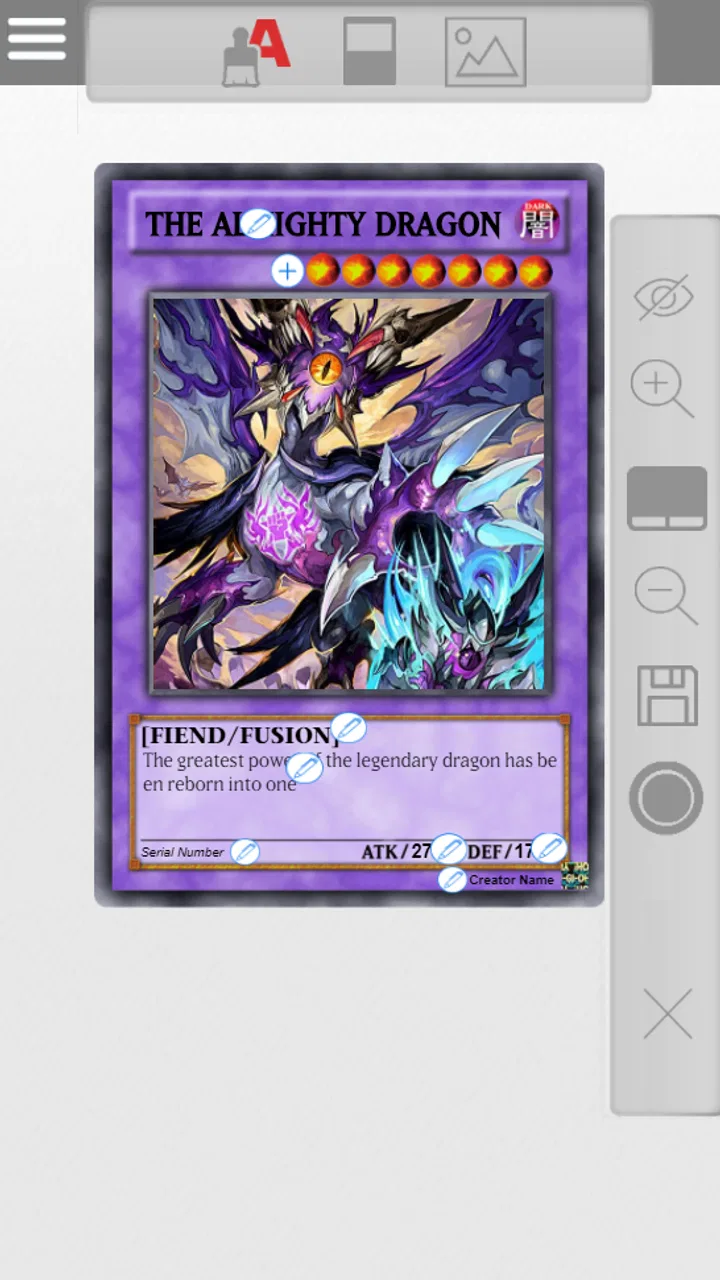
The central idea is easy to understand: choose the kind of custom card you want to make, enter or adjust the relevant content, and create an image that resembles a Yu-Gi-Oh! card. That focused purpose is helpful for people who do not want to navigate through the many panels found in general graphic editors. I can open it with a specific joke or card concept in mind and get straight to the creative task.
For a first-time user, the most comfortable approach is to begin with a simple card rather than trying to reproduce a complicated official design immediately. Start with a short name, a clear image, and compact text. This makes it easier to see how the available fields behave and whether the finished card remains readable. A long effect description may be funny in theory but can become difficult to scan once it is squeezed into a small card layout.
The app’s narrow focus is one of its strongest navigation advantages. A person who finds full editing suites overwhelming may prefer a tool that is built around one recognizable result. There are fewer creative decisions to make before starting, and that can reduce the mental effort involved in turning an idea into something visual.
At the same time, card-making interfaces often require careful attention to small labels, text fields, and settings. I would not describe this as a completely effortless experience for everyone. If you have difficulty tracking several controls at once, it helps to work in stages: prepare the wording first, select the artwork next, and review the completed card only after the main details are in place.
One practical habit made a noticeable difference for me: I wrote the card text outside the app before entering it. That avoids trying to invent a joke, balance a fictional effect, and manage the layout at the same time. It also makes it easier to shorten sentences when the result looks crowded. For meme cards, this workflow is especially useful because humor usually benefits from a brief title and one instantly understandable idea.
Text clarity matters more than visual decoration
The finished card is intended to look like a card, so the design naturally includes decorative elements, artwork, and compact information. Those details create the charm, but they can also compete with the words. Users with low vision, reading difficulties, or attention-related challenges may find a busy card harder to inspect than a plain document or a large canvas.
I recommend treating the text as the main test of a successful design. Before sharing a card, look at it at the size where a friend is likely to see it on a phone. If the name, effect, or joke needs to be enlarged repeatedly, the card is not communicating well enough. Shorter wording is usually a better solution than trying to force more information into the same space.
This is also where the app differs from a general image editor. A general editor gives you more control over font size, spacing, contrast, and positioning, but it asks you to build the entire visual structure yourself. Here, the card format does more of that work for you, while giving up some freedom. For casual creators, that trade-off is sensible; for users who need precise visual adjustments, it may become frustrating.
Motor and sensory considerations
Creating a card can be relatively manageable for someone who prefers tapping through a small number of focused actions instead of dragging objects around a large canvas. That is a meaningful advantage for users who find precise pointer movement tiring or who struggle with complex layers. A form-like workflow can feel more predictable than freehand design.
However, the app should not be treated as automatically accessible simply because it is simple. Entering text, selecting images, and moving between controls still requires touch accuracy. People with tremors, limited dexterity, or fatigue may need to take breaks or use a device setup that makes tapping easier. The experience will also depend on the phone’s own display, touch response, and system text settings.
For sensory-sensitive users, the important question is whether the visual style feels comfortable. The card format is intentionally colorful and information-dense. Someone who enjoys that look may find it engaging, while someone who prefers restrained layouts may experience it as visually busy. I would test the app with a very simple card first rather than committing to a long creative session.
Audio is not central to the task, which is helpful for people who prefer a quiet experience or cannot rely on sound. The meaningful output is visual, so the app can fit a silent commute, a waiting room, or a shared room where audio would be inconvenient. That does not solve every access issue, but it makes the tool practical in more everyday settings than an app built around spoken instructions or constant sound cues.
Another useful tactic is to separate creation from review. I can enter the information in short sessions, then inspect the card later with fresh attention. This reduces the chance of overlooking a spelling mistake or an overcrowded effect box simply because I have been staring at the same design for too long.
Situational access: when the app fits naturally
The clearest everyday use case is a quick creative exchange with friends. Imagine someone in a group chat making an inside joke about a friend’s habit, a fictional character, or a shared hobby. Instead of explaining the joke in a paragraph, you can present it as a custom card. The card format gives the idea an immediate visual identity, and the meme angle makes the result useful even when nobody is trying to design a serious playable deck.
It can also work well in a classroom or youth activity when the goal is storytelling rather than competitive play. A learner could imagine a character, give it a name, describe a special ability, and turn those ideas into a visual object. The familiar card structure may help someone who finds open-ended writing intimidating because it provides prompts: identity, image, description, and presentation.
That use requires sensible expectations. I would use it as a creative exercise, not as proof that a custom card follows the official game’s rules or can be used in an official setting. The most enjoyable results come from treating the format as a storytelling and humor device. If you need formal deck testing, rule validation, or tournament-ready preparation, a dedicated card database or a more advanced design workflow would be a better fit.
The app is also convenient when you want a result quickly on a phone rather than sitting at a computer. Its minimum operating requirement is Android 7.0, which keeps it available to many older Android devices. The current version is 2.0.0, so users should still judge the experience on their own phone, especially if they rely on older hardware or need a very responsive interface.
Because it is free, trying it does not require a purchase decision at the start. There are in-app purchases priced at $2.49 per item, so I would explore the basic workflow before paying for anything. A casual user may never need an optional purchase, while a frequent creator may consider one worthwhile if it removes a repeated annoyance. The important point is to decide based on your actual workflow, not on the excitement of making one novelty card.
Where different users may encounter barriers
The biggest barrier is the small finished format. Even when the creation process feels straightforward, a card can become difficult to read when viewed as a thumbnail or shared through a busy chat. This affects users with visual impairments, but it also affects anyone reading on a small phone, in bright sunlight, or while multitasking. A card that looks fine during editing may not remain comfortable in the context where it is eventually shared.
Long-form writing is another weak point. The app is better suited to a concise effect, punchline, or character description than to a detailed rules explanation. Users who want to create lore-heavy cards may need to edit their wording aggressively. That limitation is not just aesthetic: dense text increases the effort required for proofreading and makes the final image less inclusive for readers who need more space between ideas.
There is also a difference between creating a visual joke and communicating information clearly. Decorative card conventions can make a design feel authentic, but they may not be ideal for someone who needs high contrast, large type, or a plain reading order. If the purpose is to share instructions, educational content, or an important announcement, I would choose a document, presentation, or accessible image workflow instead.
Users who cannot comfortably perform repeated touch actions may find the app less suitable for extended projects. A short card can be manageable, but making a whole collection could multiply the same navigation and typing demands. I would plan a small batch, save the text in advance, and take regular pauses rather than treating the process like a long uninterrupted design session.
People who need collaboration tools may also prefer another option. The strength here is personal, quick creation; it is not a substitute for a shared workspace where several people can comment, revise, and maintain consistent templates. For a group project, I would use this app for individual concepts and another tool for organizing the final set.
Comparison with ordinary alternatives
Compared with a general meme generator, this app offers a much more specific visual language. A normal meme editor is usually faster for placing text over a photo and may be better when the joke depends on a large caption. The card maker becomes more appealing when the card frame itself is part of the joke or when the subject is already connected to Yu-Gi-Oh!-style fandom.
Compared with a full graphic design app, it is easier to approach but less flexible. A professional editor can provide stronger control over typography, spacing, layers, image treatment, and export preparation. That matters if you are producing polished artwork, printing a collection, or designing for readers with particular visual needs. The card maker wins when the priority is speed and recognizability rather than precision.
Compared with creating a card manually from a blank template, it removes much of the setup work. You do not have to reconstruct the general card arrangement before thinking about the idea. The trade-off is that you work within the app’s intended structure. If your concept does not fit that structure, a blank canvas may ultimately be less restrictive.
For fans who want a playful result in minutes, that balance is convincing. For serious custom-card artists, it may feel like an early sketching tool rather than a complete production environment. I would use it to test concepts, make gifts for friends, or produce humorous one-offs, then move to a more capable editor if a project grows beyond that scope.
Who will enjoy it, and who should skip it
I would recommend it to Yu-Gi-Oh! fans who enjoy inventing characters, effects, and jokes; people who want a themed way to make memes; and newcomers who find general design software intimidating. It can also suit families or informal groups looking for a creative activity with a clear visual outcome. The Everyone content rating makes it broadly approachable, although individual comfort with the card imagery and interface will still vary.
I would be more cautious about recommending it to users who need advanced accessibility controls, precise typography, extensive collaboration, or professional print output. It is also a poor match for someone who expects custom cards to be automatically balanced, officially valid, or ready for organized play. The app’s value is expressive and recreational, not authoritative.
Before starting, decide what the card is supposed to do. If it is a joke, keep the text short and make the punchline visible quickly. If it is a character concept, choose one defining ability instead of listing every detail. If it is part of a collection, prepare a consistent naming style and image approach first. These small decisions prevent the app from becoming a sequence of improvised edits.
My inclusive verdict after using it
My final view is positive but specific: this is a friendly, focused card-creation app that lowers the entry barrier to making a themed visual idea. Its free starting point, compact purpose, and familiar format make it easy to recommend for casual creativity. The 50K-plus install base suggests that it has found a real audience, while its 4.0 average from over 500 ratings points to a generally favorable experience rather than universal approval.
Its inclusiveness depends heavily on how you use it. Short text, careful proofreading, a simple image, and a final check at phone size can make the result much easier for others to understand. Users with motor or sensory needs may appreciate the focused workflow and silent, visual nature, but should not assume that a themed card interface will provide every adjustment they require.
The best reason to try it is that it turns a fandom idea into something shareable without demanding professional design skills. I would skip it for formal, highly detailed, or accessibility-critical work, but I would happily open it for a quick group-chat joke, a fictional character concept, or a small creative challenge. Used within those boundaries, Yugioh Card Maker feels purposeful, entertaining, and more useful than its brief premise first suggests.
For me, the deciding question is not whether it can replace every other design tool. It cannot. The better question is whether you want a fast, recognizable card format that helps you create something playful on a phone. If the answer is yes, Yugioh Card Maker is worth trying before moving to a more complex alternative.
FAQs for Yugioh Card Maker
01What is Yu-Gi-Oh! Card Maker, and what can I do with it?
Yu-Gi-Oh! Card Maker is a card-design application for creating custom cards inspired by the Yu-Gi-Oh! trading card game. After exploring its editor, users can usually add names, artwork, card types, effects, statistics, and other visual details. It is mainly intended for fan projects, creative experimentation, and sharing ideas—not for producing officially recognized cards for sanctioned tournaments.
02Is Yu-Gi-Oh! Card Maker an official Konami application?
No, Yu-Gi-Oh! Card Maker should not be confused with official Yu-Gi-Oh! products, such as the physical trading card game or Konami’s digital games. It is a fan-oriented creation tool, and its features, availability, and support may depend on the specific version you download. Users should also remember that Yu-Gi-Oh! names, artwork, logos, and card designs may belong to their respective copyright and trademark owners.
03Can cards created with Yu-Gi-Oh! Card Maker be used in official duels?
Cards made with the app are generally designed for casual play, demonstrations, storytelling, or personal collections. They are not automatically legal in official Yu-Gi-Oh! tournaments, local events, or sanctioned competitions. Before using a custom card in a real duel, ask the other players and agree on the rules. For competitive play, only cards and formats approved by the relevant tournament organizer should be used.
04Does Yu-Gi-Oh! Card Maker require an internet connection or account?
The exact requirements can vary between versions and platforms. Basic editing may work offline once the application is installed, but downloading templates, accessing image resources, saving projects online, or sharing finished cards may require an internet connection. Some releases may also request storage or photo permissions so you can import artwork. Review the app-store listing and permission prompts before installing, especially if privacy is important to you.
05Is Yu-Gi-Oh! Card Maker free, and are there any limitations?
Many card-maker apps can be downloaded free of charge, but the available tools may differ depending on the version. Some editions may include advertisements, optional purchases, locked templates, export restrictions, or limits on image resources. Before downloading, check the current store description, in-app purchase section, ratings, and recent user reviews. Also avoid assuming that every feature shown in promotional images is included without additional payment.
Pros
- Create custom Yu-Gi-Oh!-style cards with flexible text and stat options.
- Useful for fan projects
- casual playtesting
- and creative card concepts.
- Card designs can be personalized with artwork and visual details.
- Simple editing tools make basic card creation accessible to beginners.
- Great for sharing original ideas with friends and online communities.
Cons
- Custom cards may not follow official Yu-Gi-Oh! rules or balance standards.
- Artwork quality depends heavily on the images you import or select.
- Some features may be limited compared with professional design software.
- Created cards may not be accepted for official tournament use.
- Privacy and copyright concerns can arise when using images from the internet.

Yugioh Card Maker
Gallery